Dual-Table PCB Router: Efficient Line Change and Capacity Improvement Strategies in Batch Production
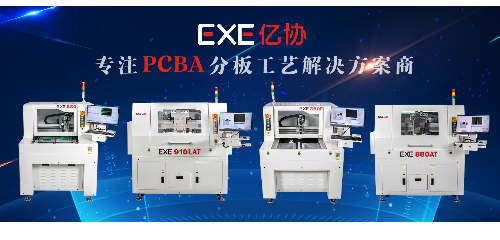
Dual-table PCB routers are core equipment for high-efficiency PCB depaneling in electronic manufacturing, featuring two independent processing tables that enable parallel operation of loading/unloading and machining. This design eliminates the non-value-added waiting time in single-table equipment, significantly boosting batch production capacity. This article systematically elaborates on line change optimization and capacity improvement strategies for dual-table PCB routers, combining process design and equipment operation practices.
1. Core Advantages of Dual-Table PCB Router for Batch Production
Compared with single-table PCB routers, the dual-table structure achieves a "machining-loading/unloading overlap" mode, which is the key to improving production efficiency in batch processing.
Zero-wait time for workpiece changeover: When Table A is performing depaneling, operators can complete workpiece loading, positioning and fixture adjustment on Table B; after Table A finishes machining, the equipment switches to Table B in seconds, avoiding downtime caused by single-table loading and unloading.
Flexible adaptation to mixed batch production: The two tables can be configured with different fixtures and processing programs independently, which supports the mixed production of multiple PCB models in small batches, reducing the frequency of large-scale line change.
Stable continuous operation: For large-batch PCB depaneling tasks, the dual-table alternate operation mode reduces the labor intensity of operators and ensures the stability of continuous production for 8-12 hours, suitable for assembly line integrated manufacturing.
2. Efficient Line Change Strategies for Dual-Table PCB Router
Line change is the main factor affecting the continuity of batch production. For dual-table equipment, line change optimization should focus on preparation work off the machine and program and fixture standardization.
2.1 Off-Machine Preparation to Minimize On-Machine Downtime
Pre-preparation of fixtures and programs: Before the current batch of production is completed, prepare the fixtures corresponding to the next PCB model and debug the processing program offline. Use the equipment's offline programming software to simulate the cutting path, verify the tool path and avoid collision, so that the program can be imported and used immediately after line change.
Standardization of fixture design: Adopt modular quick-change fixtures. The fixture base is fixed on the table, and the positioning pins and pressing blocks for different PCB sizes are designed as replaceable components. Operators can complete fixture replacement within 3-5 minutes without re-leveling the entire fixture.
Material pre-sorting: Classify and place the PCBs to be processed according to the production batch, and mark the corresponding program numbers on the material frame. This avoids the confusion of materials during line change and shortens the time of workpiece identification and loading.
2.2 Program and Parameter Optimization for Quick Switching
Program storage and calling standardization: Establish a program database for the dual-table router, and name the programs according to the PCB model number + processing type + table number. For example, "PCB-M001-CUT-TABLEA". Operators can call the corresponding program with one click without re-editing parameters.
Parameter locking for common processes: For the same type of PCB (such as rigid PCB, flexible PCB), lock the core parameters such as spindle speed, cutting feed rate and tool compensation value in the program. Only adjust the positioning coordinates during line change, reducing the probability of parameter setting errors.
Vision alignment system calibration optimization: For dual-table routers equipped with vision alignment systems, complete the calibration of the vision camera offline for new PCB models. Store the calibration parameters in the program, so that the system can automatically complete the alignment after the workpiece is loaded, avoiding repeated calibration during line change.